MetaKavita
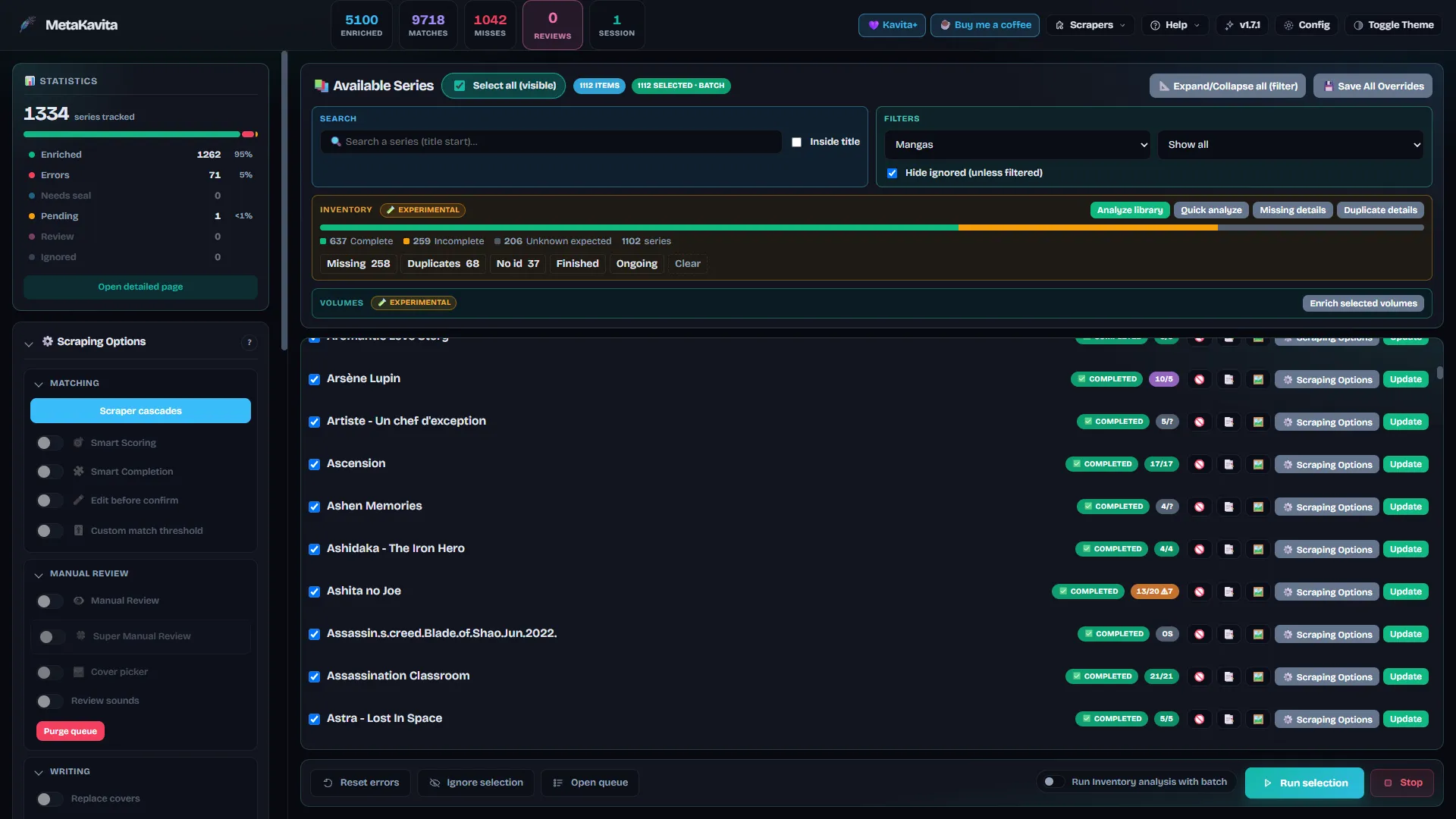
MetaKavita is a self-hosted metadata enricher and manager for Kavita . It detects library types (Manga, Comic, Comic Flexible, Book), scrapes summaries, years, publication status, genres, tags, staff, publishers, age ratings and covers from public sources, optionally translates summaries, and writes the result into Kavita through the API.
It is a community project (v1.7), actively developed. Full documentation lives in the GitHub README .
MetaKavita is designed as a LAN / VPN management tool. Read the security notes before exposing it to the public internet.
Features
Providers and community scrapers
Built-in sources cover manga, comics/BD and books. A Community Store installs extra scrapers (and keeps core ones updated) without rebuilding the image.
- Manga: MangaDex, AniList, Kitsu, Shikimori, MangaBaka, MangaUpdates, Manga-News, MyAnimeList, Anime News Network
- Comics / BD: ComicVine, Bédéthèque, BDTheque, Planète BD, Metron, League of Comic Geeks
- Books: Google Books, Open Library, Hardcover, Babelio, Decitre, SensCritique
- Community Store: optional sources such as Wikidata, plus user-made scrapers from community-scraper-metakavita
Some sources also serve a second library type (AniList, MAL, MangaBaka, Google Books, Open Library, Hardcover, SensCritique).
Matching and writes
- Smart Scoring: configured providers compete; the best match wins. Smart Completion fills missing fields from the next-best sources.
- Magic Input: paste a provider URL or ID to scrape that exact page.
- Targeted fields: choose which metadata fields MetaKavita may write, per series or for the next batch (summary, cover, staff, genres, tags, year, publisher, age rating, web links, and more).
- Manual covers: a cover you pick by hand is marked and is not overwritten by later automatic scrapes.
- Manual Review: scrape without writing to Kavita; pick, merge and edit candidates before confirming.
Library tools
- Inventory (on by default, read-only): see which series are missing volumes or chapters, find likely duplicates, export CSV/TXT. Duplicate groups show Kavita folder paths and can generate a bash
mv/rmscript — MetaKavita never deletes files or Kavita records itself. - Per-volume / album metadata (off by default): preview then write album title, summary, release date, ISBN and cover into empty fields. Sources include ComicVine, Bédéthèque, Planète BD, Manga-News, MangaDex covers, and ISBN lookups (Google Books / Open Library / Hardcover).
- Light mode: hide Manual Review, Inventory and/or volume enrichment from the sidebar if you do not use them. Hiding a section also switches that feature off.
Translation, automation, Companion
- Translate summaries with Google Translate (free), Azure Translator, or DeepL.
- Auto-sync polling and token-authenticated webhooks.
- Live dashboard: covers stream in as providers answer; batch progress and logs arrive over WebSockets.
- MetaKavita Companion (Chrome / Firefox, sideload beta): Super Review, Auto and Cover actions on Kavita series pages.
Installation (Docker)
Create a docker-compose.yml anywhere on your server:
services:
  metakavita:
    image: ghcr.io/raukorim-bot/metakavita:latest   # or pin :1.7.0
    container_name: metakavita
    restart: unless-stopped
    ports:
      - "5010:5010"
    extra_hosts:
      - "host.docker.internal:host-gateway"
    environment:
      - TRUSTED_PROXY_COUNT=0   # set to 1 if behind a reverse proxy
      # - KAVITA_URL=http://host.docker.internal:5000
      # - ROOT_PATH=/metakavita
    volumes:
      - ./data:/app/data
docker compose up -dOpen http://localhost:5010. The first run is a setup wizard (account, Kavita URL and API key, languages, options).
Do not set KAVITA_URL to localhost inside the container — that is MetaKavita itself. Use host.docker.internal when Kavita is published on the host, or the Docker service name when both containers share a network.
ADMIN_PASSWORD was removed. The wizard creates the account. To pre-provision, set ADMIN_PASSWORD_HASH (see the README).